Software for marketplace sellers
The back office for a shop that sells everywhere.
Online sales start with the right content. A product page has to be perfect — pictures, descriptions, search — and “perfect” keeps changing, because every channel has its own rules and its own search engine.
- Shopify. Your own store gets its organic traffic from Google, so this is classic SEO: Google shows about 60 characters of your title and about 155 of your meta description. Text written for Google won’t rank on a marketplace.
- Amazon. Its own search engine reads your title, bullets and backend search terms, and the rules keep moving. Since July 27, 2026, titles are capped at 75 characters, down from 200; the rest goes into a new searchable “Item Highlights” line of up to 125. Longer titles get rewritten by Amazon’s AI.
- Walmart. Search works its own way. Titles can run to 150 characters, but about 50 show in results; 3 to 10 key-feature bullets of up to 80 characters; a plain-text description of at least 150 words. All of it feeds a Listing Quality Score that moves your ranking.
- eBay. An 80-character title, and search that leans hard on item specifics.
The result: each product needs its own version for every channel — its own title, its own bullets or none, its own description, its own set of pictures. Multiply that by ten or fifteen channels and by every product in your catalog, then do it again each time a channel changes its rules.
aska.work starts where the content starts, with your master data — often a Shopify store, though any other shop engine will do. From there it prepares a product page for each channel by that channel’s rules and carries every update out to all of them.
Then it helps you sell. aska.work takes on much of what a real business does every day: some of it simpler, some of it with a hand from the system, and some of it fully automated. In the background it keeps watch over stock, prices and the Buy Box, and the system keeps growing, step by step.
It was built by a merchant with more than thirty years in online selling, and it runs his own shop every day on live sales channels.
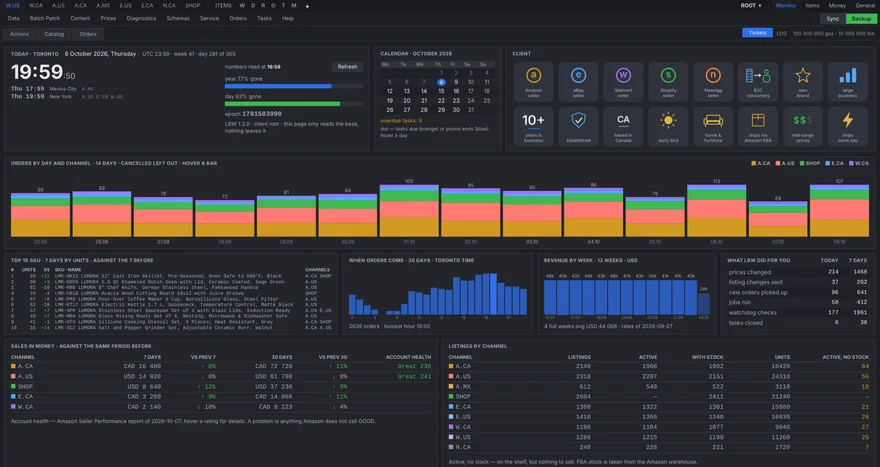
Getting started
Everything open from day one. You pay for the work done.
aska.work is set up for your shop individually, and from the first day every part of it is open to you: no plans, no tiers, no features held back for a higher price. No monthly subscription and no hidden fees.
You pay as you go. Every service that does work for you — reading a marketplace report, sending prices to every channel, building an FBA shipment, backing up the store — costs a set amount of gas, aska.work’s own unit. A quiet month costs little, a busy one costs what the work was worth, and you always see where every bit of gas went.
Stock and fulfilment
Know what you have, and what to send.
Stock on every channel in one view, with warnings before an item runs out rather than after.
Amazon FBA
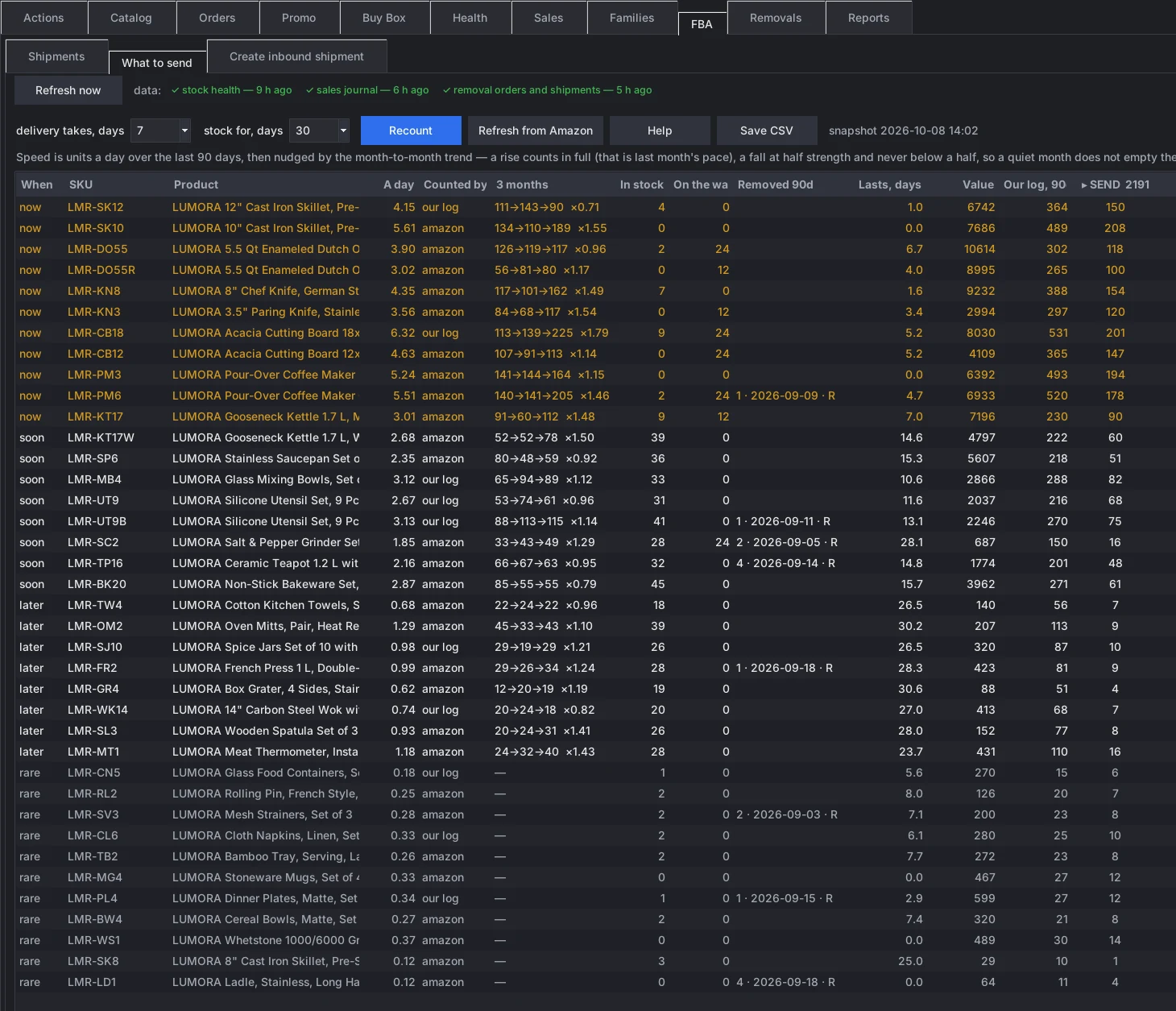
What to send, when — and the shipment in a click or two.
Every morning aska.work works out what to send to Amazon’s warehouses and when: sales speed over three months and its trend, stock on hand, units already on the way, and how long delivery to Amazon takes. Each item lands in now, soon, later or rare, with the number of units to send.
From that list an inbound shipment is created right in the system, in one or two clicks: the plan, the packing, the warehouse placement, the partnered carrier and the labels — without the Send to Amazon wizard.
- Restock advice per item and channel
- Your own delivery time and stock cover
- Morning summary in Telegram, full list by e-mail
- Inbound shipments created through the API
- Carrier quote shown before you buy
- Labels ready to print
Amazon removals
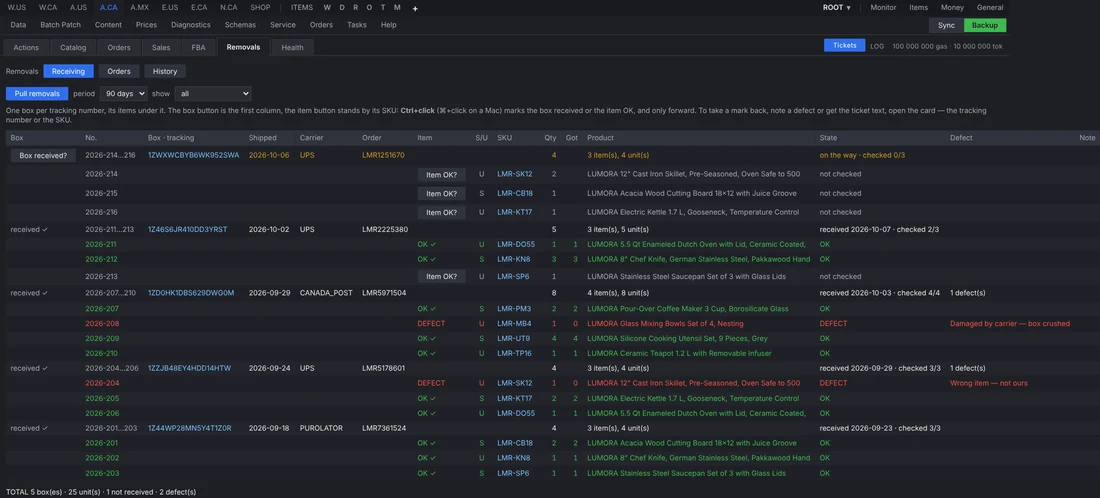
Every returned box, accounted for.
Amazon tells you about removals in two separate reports, with no boxes, no country and no way to tick anything off. Matching them by hand takes hours, and a missing unit is easy to miss.
aska.work joins orders and shipments into boxes by tracking number, numbers every line and marks each item sellable or unsellable. The warehouse checks a box off from a phone as it arrives — item by item, or a defect with what is wrong — and the text of a support case for Amazon is ready for every damaged or wrong item.
- Boxes by tracking number, newest first
- Sellable and unsellable at a glance
- Item checklist with quantities received
- Support case text drafted from the defects
- A warehouse login that sees only receiving
- Excel export for the accountant
Amazon reports
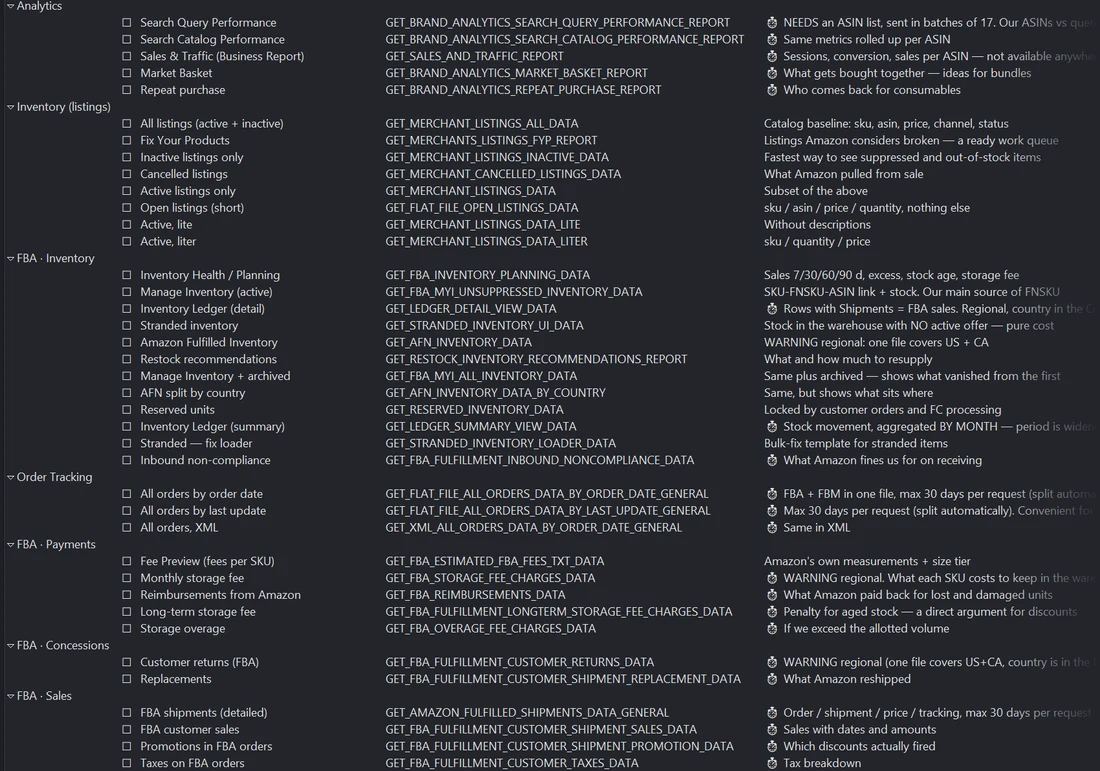
Every report Amazon has — and some you have probably never heard of.
Amazon keeps dozens of reports that most sellers never open, or do not know exist: brand analytics, search terms, market baskets, stock ledgers, stranded inventory, reimbursements, storage fees, promotions inside orders and more.
aska.work has full access to them and uses most of them every day. Each report is described in plain words, ordered and collected on schedule, and joined with the rest of the data — so the picture of what is happening on Amazon is as complete and as useful as it can be.
- Brand analytics and search terms
- Listings, suppressed and stranded
- FBA inventory, ledger and restock
- Fees, storage and reimbursements
- Returns, replacements and removals
- Orders, sales, promotions and taxes
Content and catalogue
One master record, every storefront.
Product data lives once, in the master record. aska.work turns it into what each marketplace expects and keeps every listing in step.
Sales and pricing
Prices that keep up with the market.
Change a price once and it reaches every channel. Let aska.work watch the Buy Box and move prices for you, or do it in one click.
Scenarios
How it works on an ordinary day.
Real situations, and the path each one takes through aska.work. The first happened this week, exactly as written.
A buyer could not find an answer
- QuestionA buyer asks something the product page does not answer.
- TicketThe question becomes a ticket, so it is not lost in a marketplace inbox.
- Picked upThe buyer gets an answer, and the missing fact is noted.
- Master dataThe fact is added to the product’s master record, or the text is improved.
- DeployedThe update goes out to every channel where the product is sold.
The next buyer finds the answer on the page — on every marketplace at once.
The Buy Box slipped away overnight
- Watchdog roundThe scheduled check sees 13 items where a rival now holds the Buy Box.
- TelegramA short list arrives in the morning: which items, and by how much.
- One click, or none“Apply to all” moves the group one cent under the rival, plan shown first. Or the watchdog does it itself, never leaving the price range you set.
- Next roundThe watchdog checks again and confirms which items came back.
- LoggedEvery price change is kept with the old and new value, ready to roll back.
Fifteen minutes from the alert to the fix, or no minutes at all, without opening Seller Central.
A best seller is about to run out
- Sales speedDaily sales are measured against stock on hand and stock on the way.
- Morning summary“What to send” lists what runs out first, before it does.
- Shipment planThe FBA shipment is built from that list through the API.
- LabelsBox contents and carrier labels come back ready to print.
- TrackedThe shipment is followed until the warehouse has received it.
The item never goes out of stock, and nobody had to remember to check.
A page gets seen but not clicked
- Search ConsoleA collection page shows plenty of impressions and few clicks.
- ChangeIts title and description are rewritten in the Shopify store.
- Work logThe change is recorded: what, where and why.
- ReminderA task is set to come back to it in a month.
- VerdictClicks before and after are compared, and the change is kept or undone.
Every SEO change gets an answer to the only question that matters: did it help?
Returned stock arrives from Amazon
- RemovalAmazon sends back unsellable units; the shipment and tracking are known in advance.
- Box receivedThe warehouse marks the box as it arrives, from a phone.
- CheckedEach item is ticked off as fine, or marked with what is wrong.
- Ticket textFor damaged items a case for Amazon support is drafted automatically.
- Back to stockGood units return to stock and to sale.
No box is forgotten in the corner, and no claim is lost for lack of evidence.
Shopify and marketing
See what works, and remember what you changed.
Shopify analytics, Google Analytics, Search Console and Google Ads side by side, with a record of every change and a reminder to check whether it helped.
Orders and money
From the sale to the payout.
Orders and money from every channel, reconciled against each platform’s own reports.
Communication
Every message in one inbox.
Buyer messages, alerts and notifications reach the right person on the right channel.
Telegram and text messages
The shop reports to you, not the other way round.
aska.work writes to a Telegram channel the whole team reads, and sends text messages when something cannot wait. Each job decides where it speaks: a short line in Telegram, the full table by e-mail, an SMS for what is urgent. Quiet hours hold messages until morning.
New order · A.US 2 × LMR-SK12 Cast Iron Skillet 12″ · USD 89.90
Buyer question · eBay “Does the lid fit the 5.5 qt?” · reply drafted, waiting for approval
Send to FBA · A.CA 7 items now, 10 soon · full list by e-mail
To ship today 4 orders on our own shipping, oldest from yesterday
Buy Box · A.CA lost 3, can raise 9 · tap to review
Workflow
Nothing to remember, nothing forgotten.
A task list that fills itself, a watchdog that keeps looking, and access for the people who need it.
Marketplaces
Where it works.
Several accounts on the same marketplace are fine: each keeps its own keys and its own data. aska.work is set up individually for each shop; it is not a public sign-up service.
- Shopify
- Amazon US
- Amazon CA
- Amazon MX
- Amazon EU and UK
- Amazon JP
- Amazon AU
- Walmart US
- Walmart CA
- eBay
- Reverb
- Newegg
- Allegro
Your data
Kept with the shop, not with us.
Each shop runs its own copy of aska.work with its own database and its own keys. There is no shared server that collects sellers’ data, and nothing is sold or passed on. Buyers’ names, e-mail addresses, phone numbers and street addresses are not stored.
Google Drive
If the shop connects Google Drive, aska.work keeps its archives in
a folder named aska.work in the shop’s own Drive.
It asks for one permission, drive.file: access only to
the files it creates. The rest of the Drive stays out of reach.
Access can be removed at any time at
myaccount.google.com/permissions.
Details are in the Privacy Policy.